Multicorder app icon

Your Mac's control room.

Wire cameras, microphones, screens, iPhones and instruments to recordings, live streams and video calls. One record button – everything in perfect sync.

Coming soon to the Mac App Store See how it works
FreemacOS 14 Sonoma or laterNo accountNo tracking
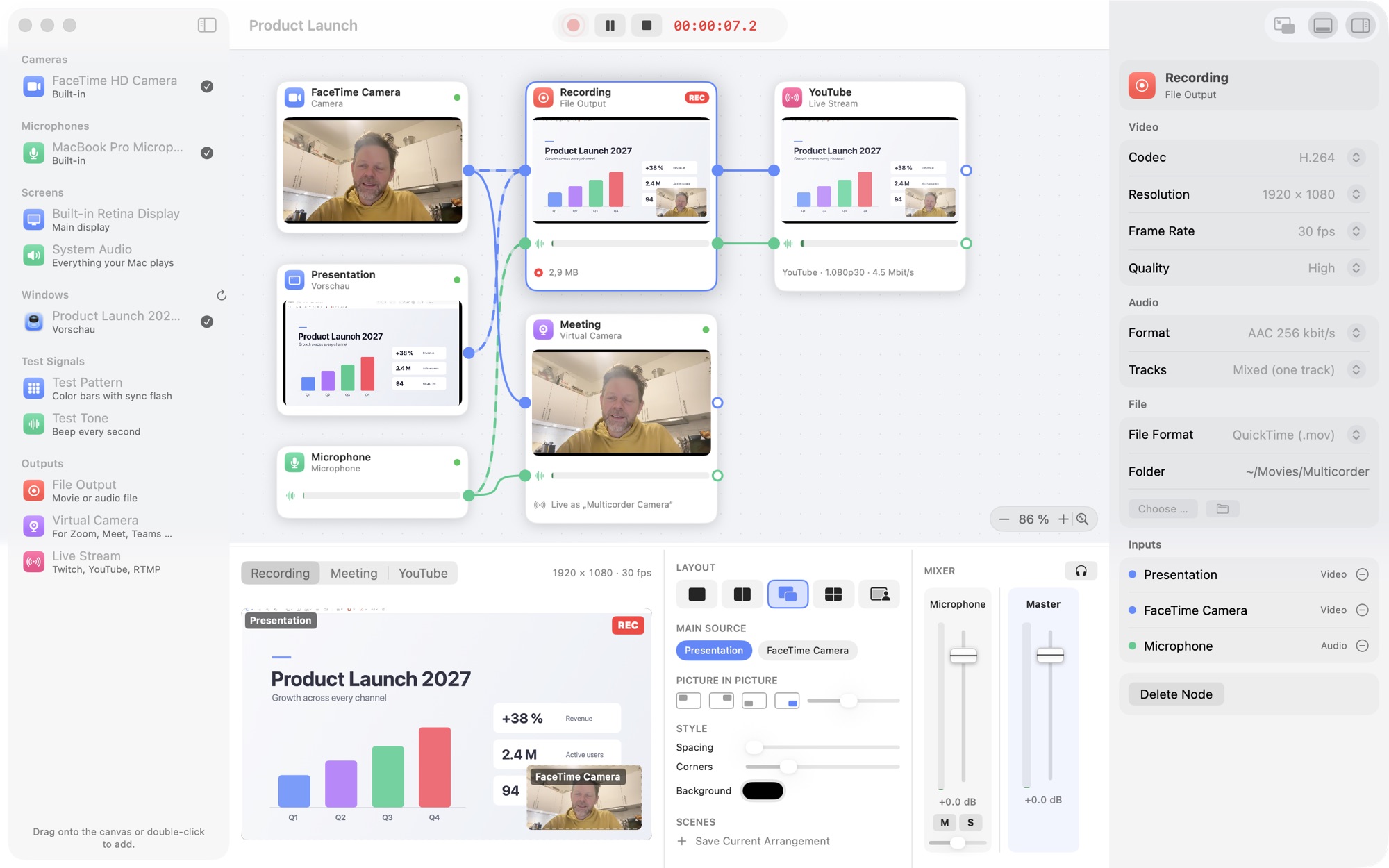
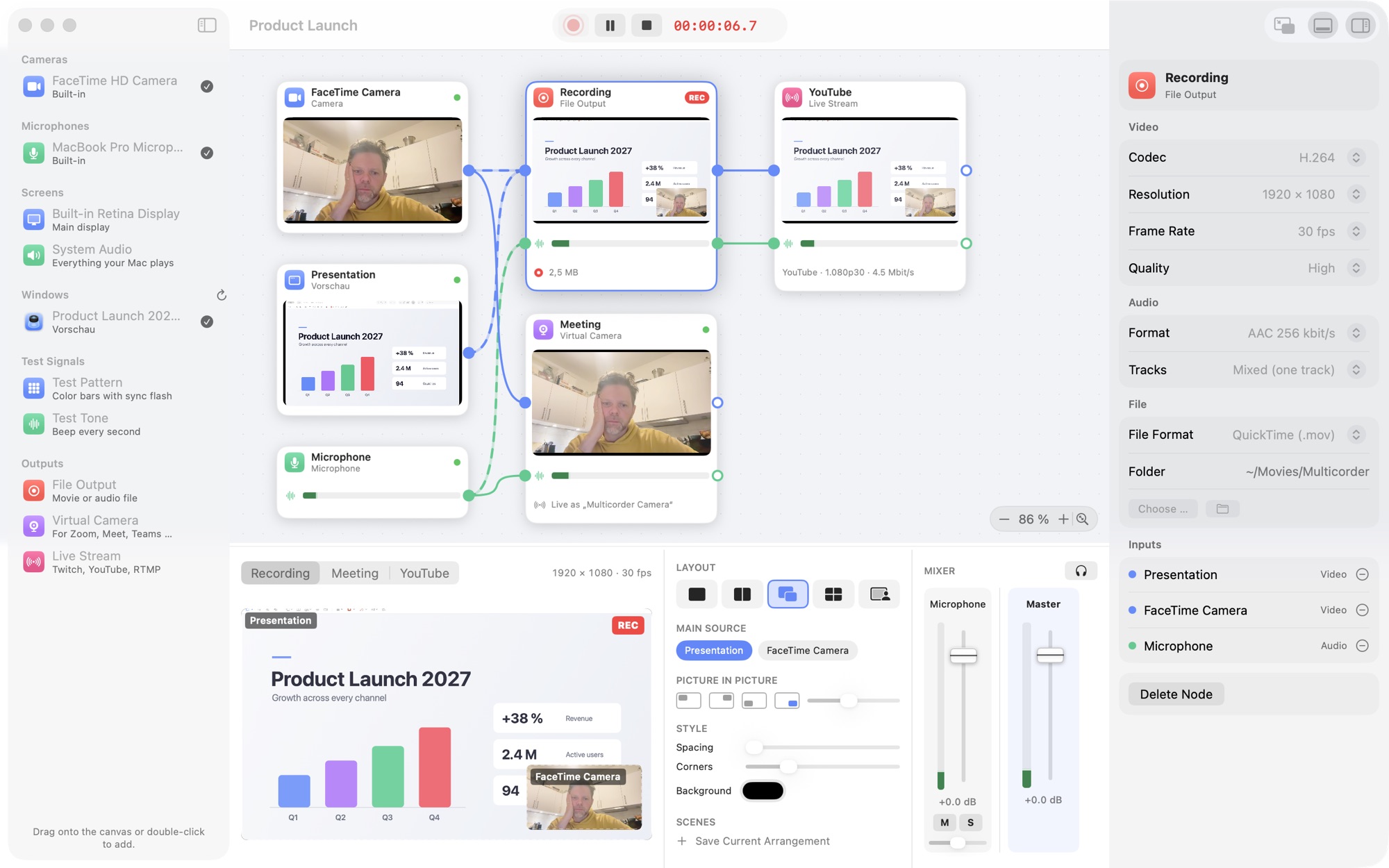
Multicorder's canvas: a camera, a presentation window and a microphone wired to a recording, a meeting and a YouTube stream.
How it works

Drag. Connect. Record.

Every source and every output is a node. Draw a wire and the signal flows – as many outputs at once as you like.

1

Drag in your sources

Cameras, microphones, displays, single app windows, an iPhone or a MIDI keyboard – straight from the library.

2

Wire them to outputs

A movie file, a live stream, the virtual camera for your meeting – or all of them. Outputs can even feed each other.

3

Press record

One button records, pauses and stops everything together. Arrange the picture and mix the sound live while you go.

Live layouts

Switch layouts while you record

Side by side, picture in picture, grid or presenter – one click, with a smooth animated transition. Drag, resize and crop right in the program picture.

  • Save scenes and recall them with ⌃⌥⌘1–5
  • Landscape 16:9 or portrait 9:16 for Shorts, Reels and TikTok
  • Spacing, rounded corners and background color
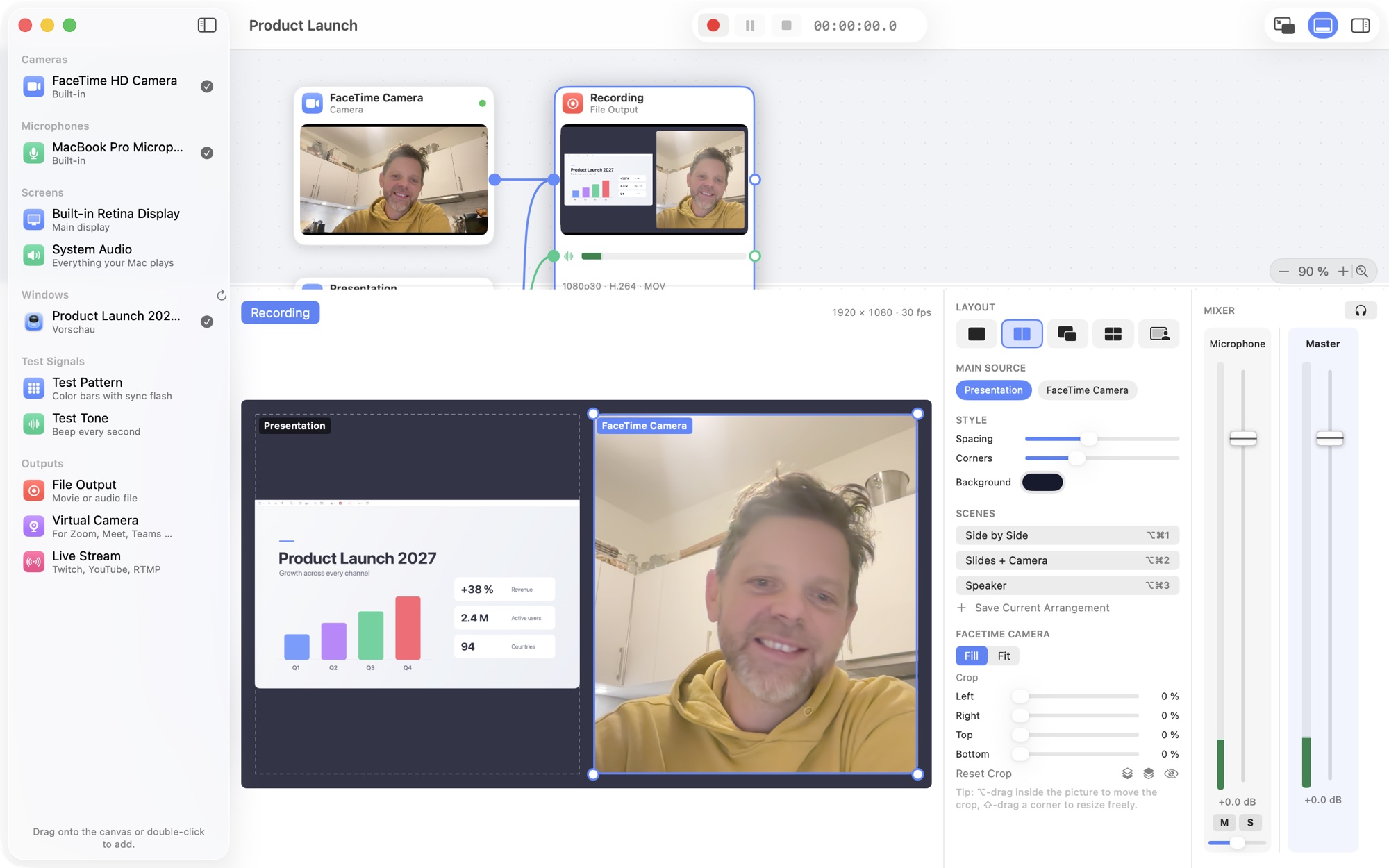
The live panel with layout presets, a cropped presentation and camera side by side.
Live mixer

Mix every voice live

Faders, pan, mute, solo and level meters for every input – and a headphone button to listen to the mix.

  • A separate track per microphone for editing later
  • AAC or uncompressed 24-bit PCM
  • Audio interfaces with all their inputs, delay compensation per source
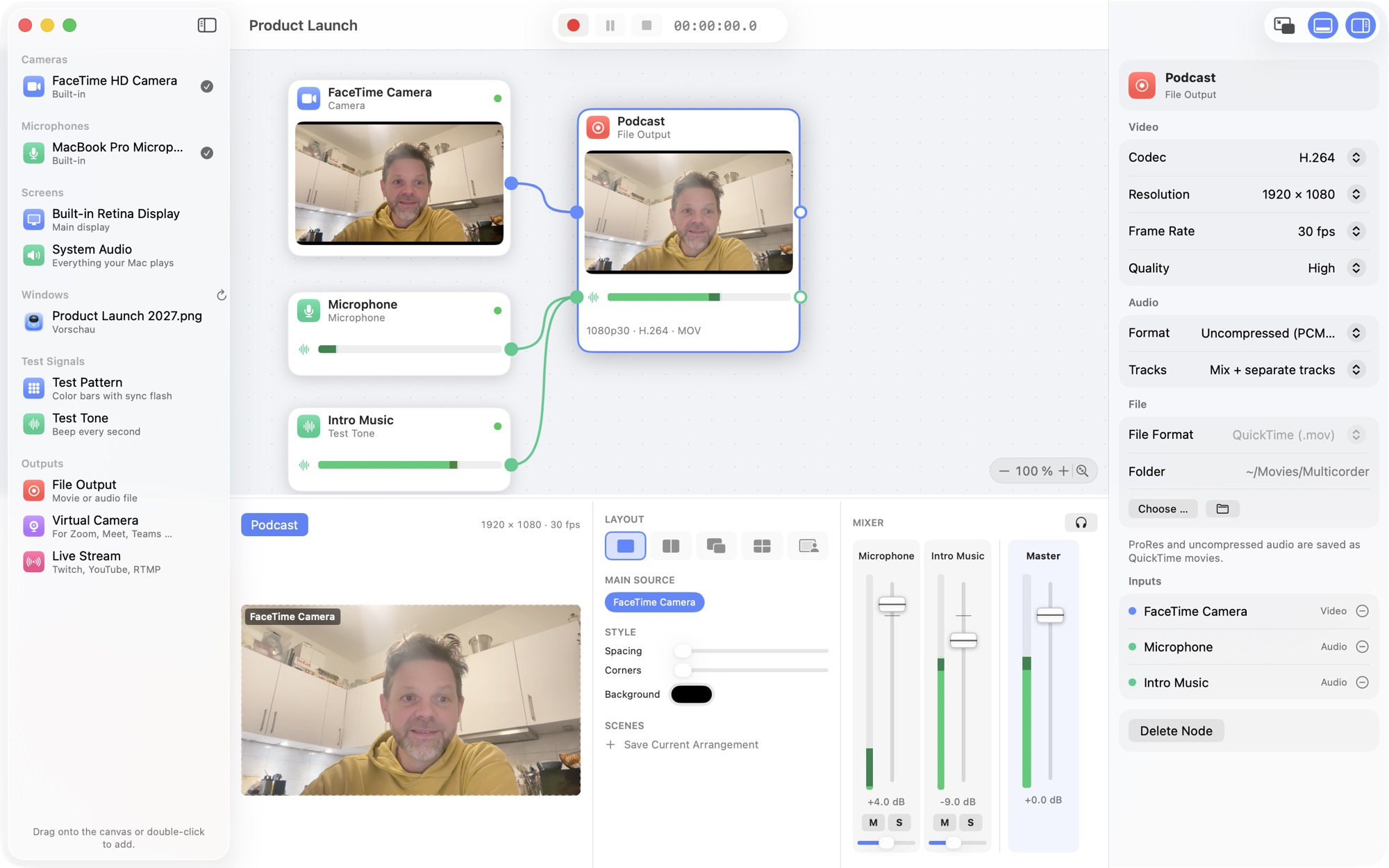
A podcast setup with camera, microphone and intro music mixed live.
Live streaming

Go live on Twitch & YouTube

Stream to Twitch, YouTube or any RTMP server – encrypted, hardware-encoded and with automatic reconnect. And record the same show to a file at the same time.

  • Your stream key stays in the macOS keychain
  • Test mode for Twitch before you go public
  • Portrait streams for vertical platforms
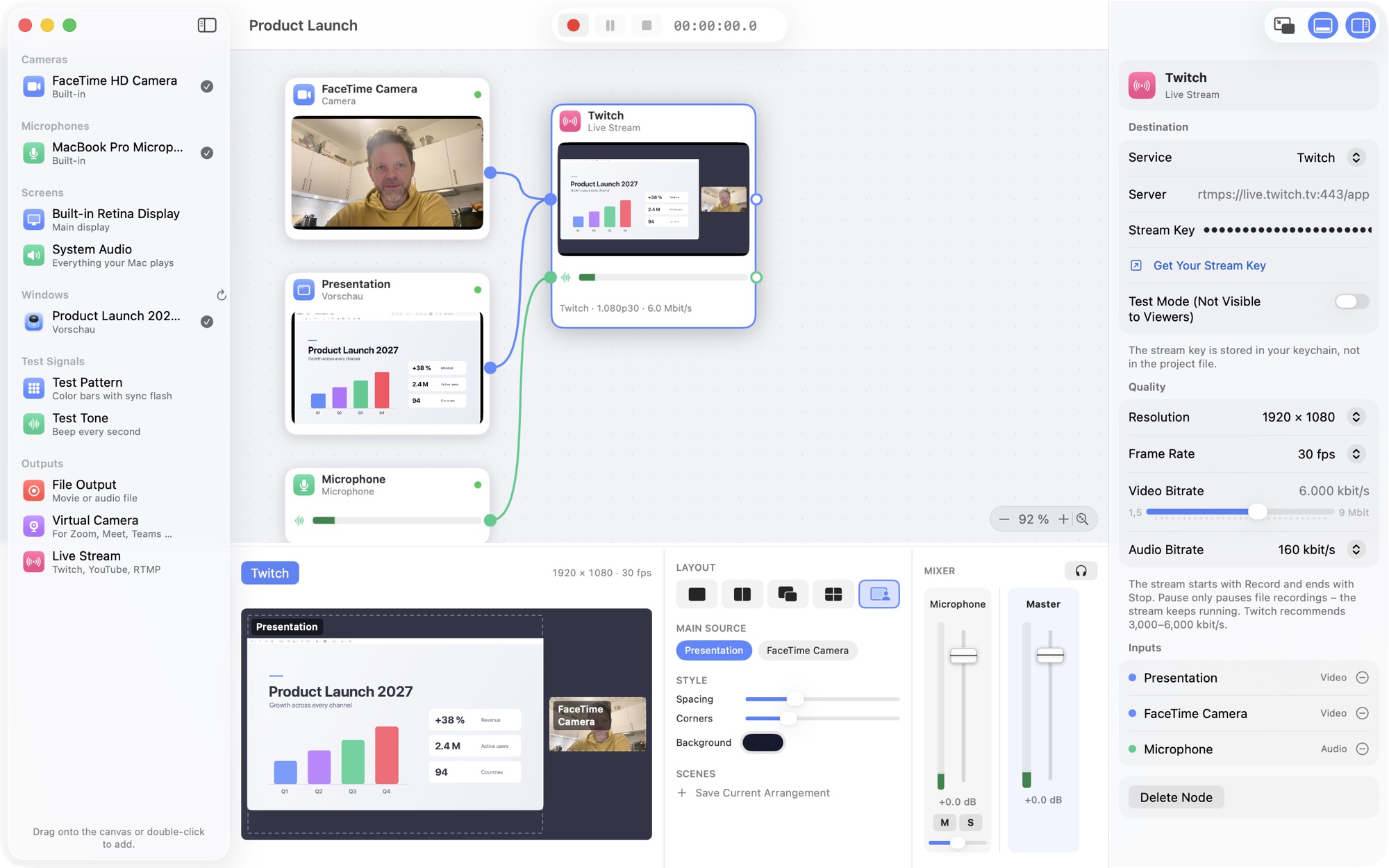
A Twitch stream in presenter layout with slides and camera.
Meetings & control

Look great in every meeting

The virtual camera brings your composed picture to Zoom, Google Meet, Microsoft Teams and FaceTime. A floating mini control, the timer in the menu bar and global shortcuts keep you in charge – even from another app.

  • Record exactly what the meeting sees
  • Standby picture until you press record
  • ⌃⌥⌘R record, ⌃⌥⌘P pause – from anywhere
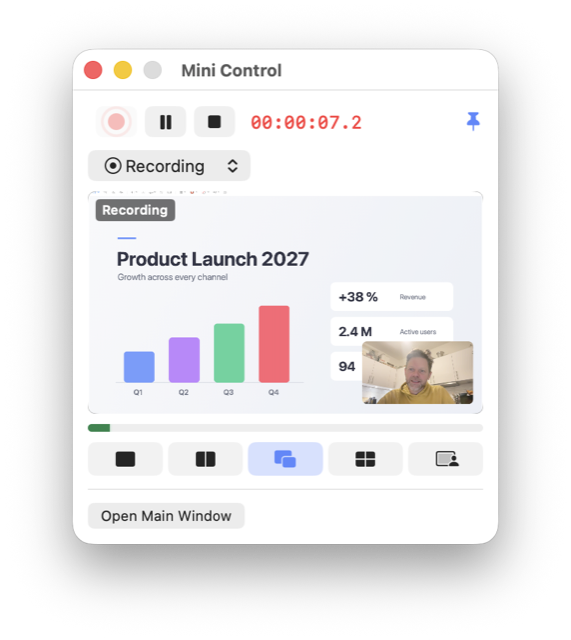
A meeting setup with the main window and the floating mini control. The mini control window with preview, timer and record button.
New

Bring your band. And your iPhone.

Play instruments, run your amp simulators and capture an iPhone or iPad – right next to your cameras.

For musicians

A live rack for instruments and effects

Plug in a MIDI keyboard and play any Audio Unit instrument. Run your guitar through amp simulators, reverbs and compressors – chained like pedals and monitored on your audio interface within a few milliseconds.

  • Your Audio Unit plug-ins and their own windows
  • Every input of your audio interface
  • Recorded and streamed in sync with the video
  • MIDI only shows up when a keyboard is connected
iPhone & iPad

Your iPhone screen as a source

Connect an iPhone or iPad with a cable and its screen and sound become a source – perfect for app demos, mobile games and tutorials.

  • Full resolution at up to 60 frames per second
  • Portrait screens are shown whole, not cropped
  • The device's sound on its own track
Under the hood

In sync, down to the sample

Every picture and every sample carries a timestamp on one shared clock. So audio and video stay together – across devices, through pauses and from output to output.

< 1frame of audio/video offset, measured
4K60up to 4K at 60 fps, H.264, HEVC or ProRes
< 10 mslive monitoring through your audio interface
1record button for every output – all in sync
And much more

Thought through, down to the details

Templates

Podcast, multi-camera, screen with camera, meetings – ready in seconds.

Any app window

Capture a single window – found again even after its app restarts.

Portrait 9:16

Shorts, Reels, TikTok and vertical streams with their own layouts.

Pause without gaps

Pause and resume all outputs together, perfectly in sync.

A track per voice

The mix plus separate tracks for every microphone.

Pro codecs

H.264, HEVC and Apple ProRes 422 up to 4K – hardware-encoded.

Global shortcuts

Record, pause and switch layouts from any app.

Mac & app audio

Everything your Mac plays – or just one app, like your amp app or Logic Pro.

English & German

Follows your Mac's language – or pick one in the settings.

Made for

One app, many stages

Start from a template and adapt it – or build your own setup from scratch.

Tutorials & courses

Screen, window or iPhone with your camera as picture in picture.

Podcasts

Several microphones, mixed live, every voice on its own track.

Streaming

Twitch and YouTube with scenes – and a recording of the same show.

Meetings & webinars

Slides and camera composed for Zoom, Meet or Teams – recorded as well.

Music & bands

Instruments, amp simulators and vocals – streamed and recorded in sync.

Multi-camera interviews

Two cameras into two synchronized files, ready for the edit.

Your recordings stay on your Mac

Multicorder has no servers, no accounts and no analytics. Picture and sound only leave your Mac when you send them – to your stream or your meeting.

No accountNo trackingNo adsData not collected
Specifications

Everything at a glance

Sources
Cameras incl. Continuity Camera and Desk View · microphones and audio interfaces · displays and single windows · Mac or app audio · iPhone and iPad screens · MIDI keyboards and Audio Unit instruments · test pattern and tone
Outputs
Movie and audio files · virtual camera for video calls · live streams via RTMP or RTMPS – any number at once, chainable
Video
H.264, HEVC, Apple ProRes 422, LT and Proxy · 720p to 4K · 24 to 60 fps · landscape 16:9 or portrait 9:16
Audio
AAC 256 kbit/s or 24-bit PCM · 48 kHz · mix and separate tracks per input
Streaming
Twitch, YouTube and custom servers · hardware H.264 · automatic reconnect
Plug-ins
Audio Units: effects and instruments, including third-party plug-ins
Virtual camera
1920 × 1080 at 30 fps for Zoom, Meet, Teams, FaceTime and more (video)
Requirements
macOS 14 Sonoma or later
Languages
English, German
Price
Free
Questions & answers

Good to know

Is Multicorder really free?

Yes. No subscription and no account – just download it from the Mac App Store.

Which Macs does it run on?

On every Mac with macOS 14 Sonoma or later. Video is encoded in hardware, so even long 4K recordings stay light on your Mac.

Can I record and stream at the same time?

Yes. Connect as many outputs as you like – files, streams and the virtual camera. One record button starts them all, and outputs can feed other outputs, for example to record exactly what your meeting sees.

Does the virtual camera include sound?

The virtual camera sends the picture. In your meeting app, keep using your microphone as usual.

Can I use my VST plug-ins?

Apps from the Mac App Store can load Audio Units (AU), not VST. Most manufacturers install an AU version next to the VST one – amp simulators, reverbs and synths included. For plug-ins that run in their own process, macOS asks once for your permission.

How do I connect my iPhone or iPad?

With a cable. Unlock it and tap “Trust” if asked – it then appears under “iPhone & iPad”. Copy-protected apps (for example some music and video streaming apps) stay silent or black, as in any screen recording.

Where are my recordings saved?

In Movies → Multicorder, or in a folder you choose for each output. Nothing is uploaded anywhere.

Does Multicorder collect any data?

No. There are no accounts, no analytics and no servers. Details in the privacy policy.

Still have a question?

Write to us – we read every message and love feature ideas.

Email support

Ready when you are.

Multicorder is free on the Mac App Store.

Coming soon to the Mac App Store